How to reverse or correct a
property development billing
Credit note, debit note, offset, adjustment, rebate or refund note. Which one you need, why the 72 hour window decides it, and what to record every time.
- August 2026
- last reviewed
- 12 min
- read
- Free
- no login, no email
The short answer
Do not pick the document first. Check whether LHDN has validated the e-Invoice, then whether you are still inside the 72 hour window. If you are inside it, cancel and reissue. If you are past it, the invoice is permanent and can only be corrected by a credit note, debit note or refund note linked to the original by its UUID.
Most correction errors in property development are not accounting errors. They are sequencing errors. Somebody decides they need a credit note before checking whether the invoice could simply have been cancelled, and the developer ends up with a document chain it did not need and cannot easily unwind.
This chapter walks the gates in the order they should be walked, then explains what each document actually does.
Start with the gates, not the document
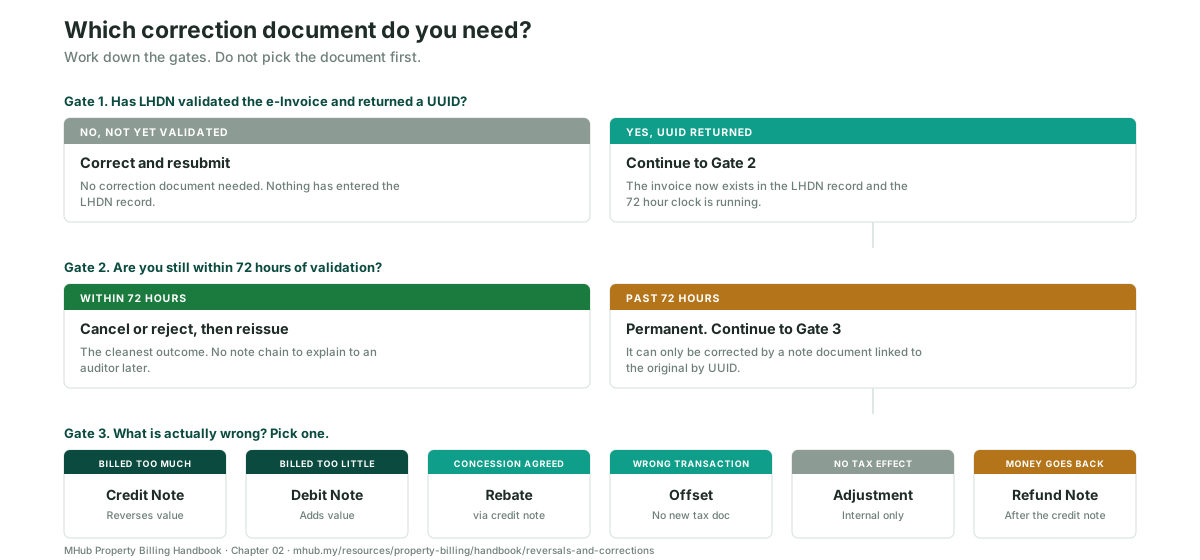
Swipe the diagram sideways to see all three gates.
Gate 1. Has LHDN validated the invoice?
If the billing has been raised in your own system but has not yet been submitted and validated by MyInvois, no correction document is needed at all. Fix the source billing and submit it. Nothing has entered the LHDN record, so there is nothing to correct there.
This is the cheapest outcome available and it is missed constantly, usually because someone assumes an issued billing is automatically a submitted one.
Gate 2. Are you within 72 hours of validation?
Once a UUID comes back, a clock starts. You have 72 hours from validation to cancel or reject the document. Inside that window you can cancel the e-Invoice and issue a clean replacement, and the correction leaves no note chain behind it.
Past 72 hours the invoice is permanent. It cannot be cancelled, only corrected by a subsequent note document that carries the original UUID.
Why this makes the 72 hours a process control, not a software feature. If your review step happens weekly, every error you find is automatically past the window. If your review step happens the next working morning, most errors are still inside it. The window does not reward better software. It rewards a shorter feedback loop between issuing and checking.
Gate 3. What is actually wrong?
Only now does the document type matter.
The six documents and what each one does
| Document | Use it when | What it actually does |
|---|---|---|
| Credit note | You billed too much, or the stage should not have been billed at all | Reverses value against the original transaction. Must carry the original LHDN UUID. |
| Debit note | You billed too little, or an item was omitted | Adds value against the original transaction. Also linked by UUID. Do not raise a fresh standalone invoice instead. |
| Rebate | A commercial concession has been agreed with the purchaser | Issued as a credit note. It must be offset against the original progress billing before the rebate can be approved. Covered in full in chapter 03. |
| Offset | Money is sitting against the wrong transaction | Moves an existing credit against an existing debit. No new tax document is created. |
| Adjustment | A ledger correction with no tax effect | Internal only. If it changes what the purchaser or the financier owes, it is not an adjustment. |
| Refund note | Money has to go back to the purchaser | Raised after the credit note, never instead of it. The credit note establishes the reduction, the refund note moves the money. |
Swipe the table sideways to read the third column.
The line between an adjustment and a credit note
This is where most teams blur. Ask one question: does the correction change the amount the purchaser or the financier is obliged to pay? If it does, it is a credit note or a debit note and it needs to reach LHDN. If it only changes how the same amount is presented in your own ledger, it is an adjustment. Using an adjustment to quietly reduce a purchaser's balance is the single most common finding in a billing audit.
Sequence matters more than the document
Four ordering rules that do not bend.
Credit note before refund note. Always. A refund with no credit note behind it is money leaving against a live receivable.
Offset before the rebate is approved. Approving the rebate first and offsetting later leaves an orphan credit that nobody can tie back.
Reversal before the unit is relisted. On termination, the reversals have to clear before the unit goes back into inventory, or the next buyer inherits the old ledger.
Never correct a validated invoice by issuing a second invoice. It breaks the UUID document chain, and the chain is exactly what an audit follows first.
The specific case of termination
Termination is the largest reversal a credit admin team will handle, and it is the one most likely to be done in the wrong order because there is commercial pressure to get the unit back on the market.
The sequence in the prescribed SPA runs: apply the purchaser's prior payments to any outstanding late payment charges, forfeit the sum stipulated in the agreement, then refund the balance to the purchaser. Neither party then has any further claim under the agreement.
Three things follow from that for the billing record.
- Every issued and validated billing on that unit needs a credit note. The billings do not simply disappear because the SPA has ended.
- The forfeited sum is not a reversal. It is retained income and it is treated as such, not netted off inside the credit note.
- The refund note comes last, for the balance only, after forfeiture and late payment charges have been applied.
Do not quote a forfeiture rate from memory
Industry guidance and the gazetted Schedule do not read identically on whether forfeiture is a flat percentage of the purchase price or tiered against how much the purchaser has already paid. Read the forfeiture clause in the executed SPA for that project before you compute anything. Getting this wrong means either a shortfall the developer cannot recover, or an over-forfeiture the purchaser can challenge.
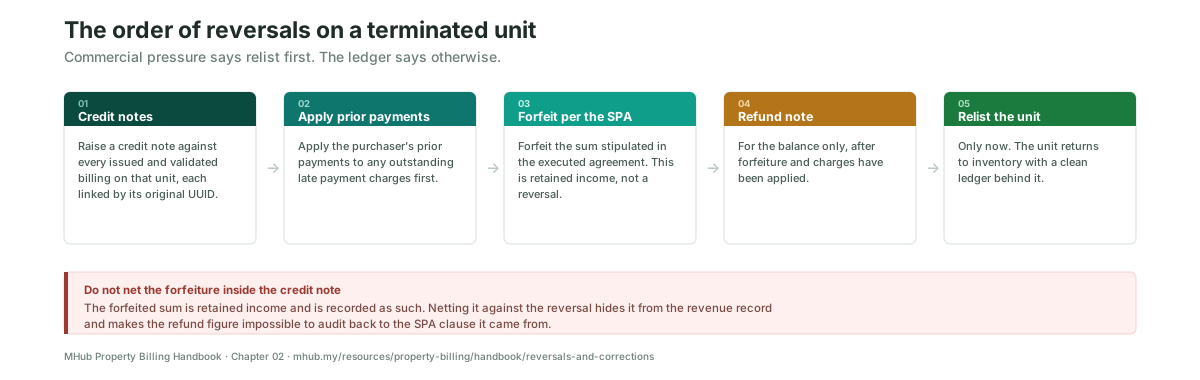
Swipe the diagram sideways to see all five steps.
What to record on every reversal
Six fields. If your system does not capture them, capture them somewhere else, because these are the fields an auditor asks for and the fields that let you spot a pattern.
- Reason code, from your own fixed list. Free text is not a reason code, because you cannot count it.
- Original transaction number.
- Original LHDN UUID.
- New LHDN UUID for the note document.
- Approver name and date.
- Who was notified: purchaser, end financier, or both.
Reversal volume by reason code is the cheapest quality metric a credit department has. If the same code keeps appearing, the problem is upstream of credit admin. Wrong stage suggests a certificate control problem. Wrong unit suggests a payment schedule problem. Wrong amount suggests the amount is being keyed rather than pulled from the schedule.
What this affects downstream
The payment clock resets. A corrected billing is a new notice, and the purchaser gets a fresh period from receipt of it. A reversal in month four can push a collection into month five without anyone deciding to.
Late payment charges become contestable. Charges computed on a billing that was later credited are hard to defend, and the SPA is unforgiving about notices that do not comply.
Bank drawdown stalls. Where the end financier was billed, the financier's solicitor now holds a document that has been credited. Reissue and reconfirm, or the drawdown simply sits.
The HDA withdrawal support weakens. Withdrawals must be supported by an architect's certificate. A messy billing history against a certified stage makes that support harder to evidence.
Last reviewed August 2026. Statutory references are to the Housing Development (Control and Licensing) Act 1966 and the schedules prescribed under it. e-Invoice references are to the LHDN MyInvois system. This page is a working reference for developer credit administration teams. It is not legal or tax advice, and the executed Sale and Purchase Agreement for your project governs.
Written and maintained by MHub, which builds sales and credit administration software for Malaysian property developers.
Frequently asked
Yes, but only within 72 hours of validation. After that it is permanent and can only be corrected by a credit note, debit note or refund note linked to the original by UUID.
A credit note changes what the purchaser or financier owes and has to reach LHDN. An adjustment is an internal ledger correction with no tax effect. If the amount owed changes, it is not an adjustment.
No. It breaks the UUID document chain and leaves two live invoices for the same stage. Use a credit note or a debit note linked to the original.
The corrected billing is a fresh notice, so the payment period runs again from the purchaser's receipt of it. This is why reversals have a real cash flow cost beyond the admin time.
Credit notes against the issued billings, then apply prior payments to outstanding late payment charges, then forfeit the sum stipulated in the SPA, then a refund note for the balance. The unit is relisted after that, not before.
The purchaser always. The end financier and its solicitor if they were billed, because they are holding a document that has now been credited and the drawdown will stall otherwise.
Take the working sheet
One printable A4 page covering the process on this page. No account needed.
Download the sheetNo form, no email required.
Take this further
-
Chapter 01 · Progress billing mechanics
What triggers a billing in the first place, and the Third Schedule stage by stage.
Previous chapter -
Chapter 03 · Rebates and e-Invoice
What a rebate actually is, and why it must be offset before approval.
Next chapter -
All six chapters
Back to the handbook, and the rest of the billing lifecycle from booking to vacant possession.
Open the handbook
Fewer reversals in the first place
MHub Credit Control links every note document to its original UUID, and records the reason code, approver and notification on each one.